


Office use in the Cloud or locally on the PC
With Microsoft 365, Microsoft offers the familiarity and power of the Microsoft Office suite combined with the flexibility of the cloud. Well-known Office products such as Outlook, Word, Excel, and PowerPoint are available in the cloud, but SharePoint is also part of Microsoft 365. This gives you access to all documents 24 hours a day, 365 days a year. You can therefore get to work immediately, wherever and whenever you want. With Microsoft 365, employees are able to respond directly to customers and colleagues because they can access the right and most up-to-date knowledge.
Using Office in the Cloud
Office 365 is hosted on Microsoft's servers. Thanks in part to the large scale at which they operate, a high level of security and high availability are guaranteed. You do not need to purchase an expensive Office package, and you do not need to worry about software or hardware updates. System updates are implemented directly in Office 365 after extensive testing and with timely announcement. As a result, you always work with the best and latest features without having to concern yourself with software installations. An internet connection is required.
Use Office in the Cloud and locally on your computer
Microsoft 365 can also include the desktop version of Office. One of the benefits of the desktop version of Office programs is that you can work offline. Furthermore, all your work is automatically synchronized the next time you connect to the internet. This ensures that your documents are always up to date. The desktop version of Office is also automatically updated when you connect to the internet. This means that you can always work with the latest version of the programs.
Have you purchased a version of Office in the past?
Then you would be better off using Hosted Exchange Online. See here the possibilities.

Your Office at hand everywhere
Whether you are working in the office or on the go, your trusted productivity programs are always within reach. With the Office applications (and always the latest version), you can create and edit data from your PC/Mac, iPad®, tablet, or phone, and share it with others in real time. Microsoft 365 synchronizes email, calendars, and contacts in real time across different devices. So the information is always up to date, no matter which device you are working with.
The freedom to work from anywhere
Choose the freedom to live and work in a way that is best for both teams and individuals. Today's business user wants more intuitive technology, uninterrupted services, and the freedom to work where and when needed. With Microsoft 365, location no longer matters; your employees can now decide for themselves how and where they want to work.
Connected people are productive people
Microsoft 365 keeps people connected to each other, to documents, and to data. Intuitive tools for online meetings, file storage, and file sharing make it easy to connect and collaborate with colleagues wherever and whenever you want.

Subscription type and rates
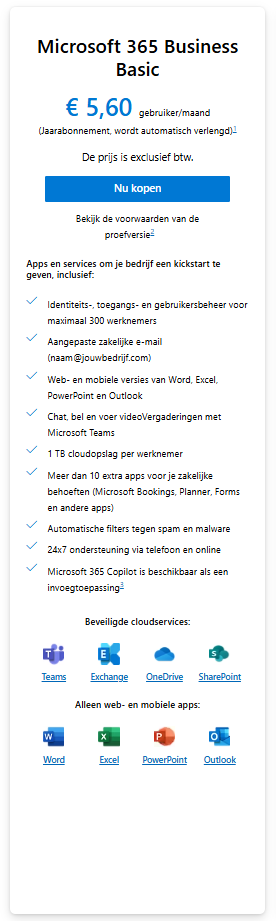
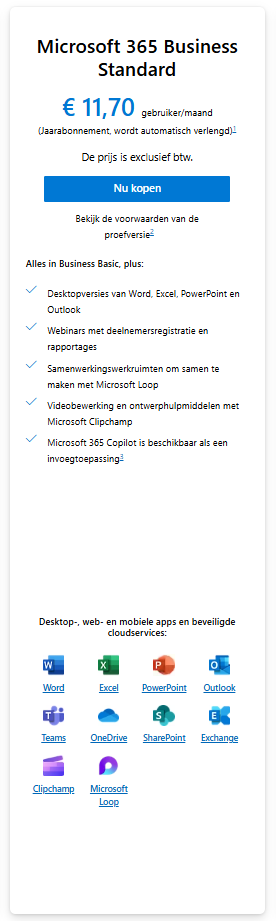
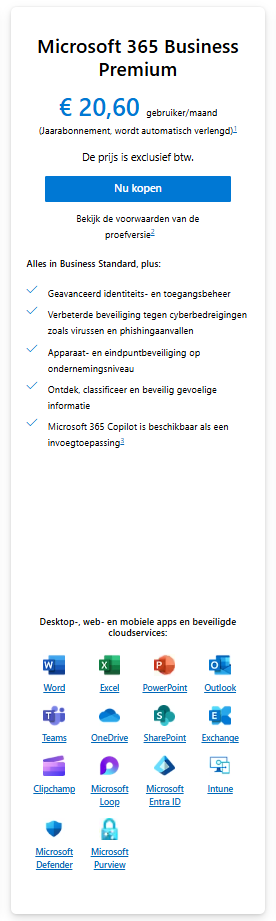
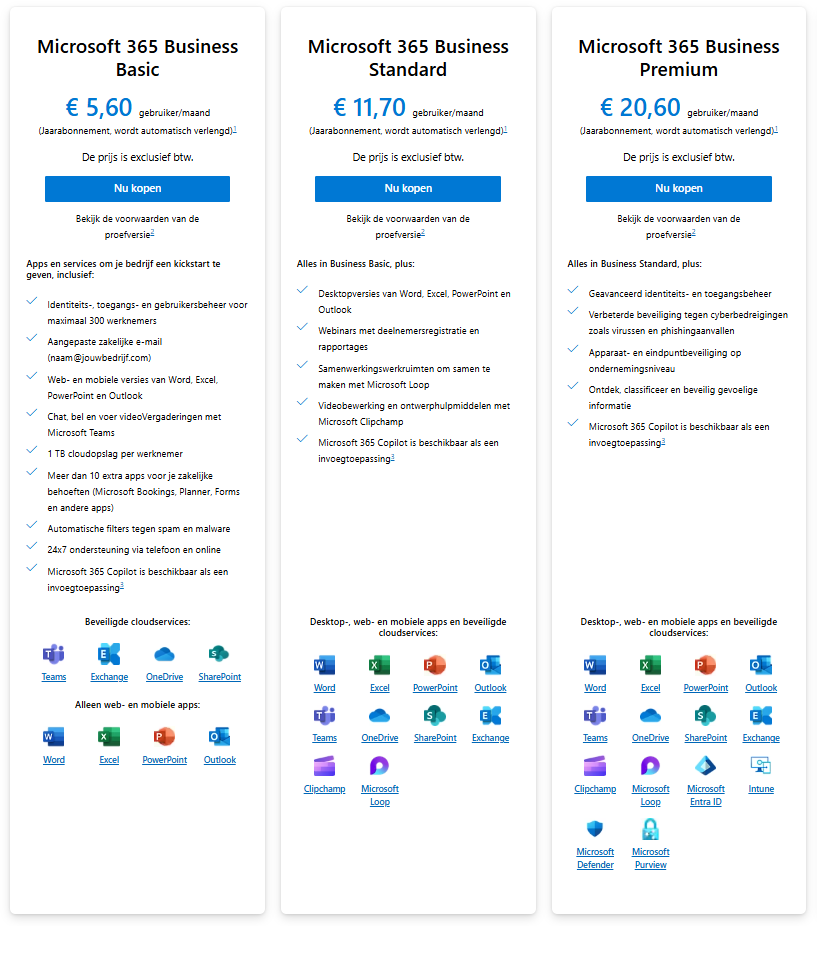
Depending on the functionalities you wish to use within the Microsoft 365 package, costs range from €3.80 to €20 per user per month. Reduced rates are available for non-profits, government agencies, and educational institutions, or it is even offered completely free of charge. We are happy to help you choose the right subscription plan that suits your organization.
Subscription type and rates
Depending on the functionalities you wish to use within the Microsoft 365 package, costs range from €3.80 to €20 per user per month. Reduced rates are available for non-profits, government agencies, and educational institutions, or it is even offered completely free of charge. We are happy to help you choose the right subscription plan that suits your organization.
As of October 1, 2019, we are authorized to call ourselves a Microsoft Cloud Solutions Provider.


You must be logged in to post a comment.